
AI Project Management for PMs: Start with Two Week Pilots
AI in project management automates repetitive work like meeting notes and status updates, sharpens forecasting through pattern detection in historical data, and gives project managers time back for judgment calls that software can’t make. The payoff shows up fastest when you stop trying to automate everything at once. Pick one repetitive task this week, audit how it’s currently done, and run a two-week pilot before touching anything else.
TL;DR:
- Automating meeting minutes and status reports can deliver quick wins, especially when piloted on medium-sized internal projects with low stakes.
- AI tools should be used for tasks with low complexity and risk, reserving full automation for simple tasks like transcription and structured summaries.
- Successful AI adoption requires disciplined governance, including decision logs, traceability, bias checks, and clear rollback plans from the start.
- Building core skills such as data literacy, prompt engineering, and stakeholder leadership helps project managers effectively question and leverage AI outputs.
- Starting with targeted pilots that track specific impact metrics ensures the technology improves project outcomes before broader deployment.
Table of Contents
- What AI in Project Management Actually Does
- Where to Start: High-Value Use Cases That Pay Off Fast
- How Do You Roll Out AI Across a Project Team?
- What Skills Should Project Managers Build Now?
- Governance and Ethics: The Controls You Can’t Skip
- Segua.ai: A Working Example of Automation With Traceability Built In
- An Editorial Take: AI Augments Judgment, It Doesn’t Replace It
- Get Started With Segua.ai
- Sources
- FAQ
What AI in Project Management Actually Does
Most confusion about artificial intelligence project management comes from treating “AI” as one thing. It isn’t. There are three distinct levels of involvement, and knowing which one you’re dealing with keeps expectations honest.
Automation replaces a task entirely with minimal human input. Transcribing a meeting into structured minutes is automation. Assistance speeds up a task a human still owns, like drafting a status report that a PM then edits and sends. Augmentation is different in kind: the system surfaces patterns or scenarios a person couldn’t spot alone, such as flagging that three unrelated tasks share a vendor dependency that’s historically caused delays.
The gap between these levels matters because of data quality. A model trained on messy, incomplete project histories will produce confident, wrong forecasts. The Association for Project Management recommends reserving full automation for low-complexity, low-risk tasks and keeping a human checkpoint on anything with real consequences.
Rough mapping for common PM tasks:
- Meeting minutes and transcription: automation
- Status report drafting: assistance
- Schedule risk scenario planning: augmentation
- Requirements extraction from recordings: assistance, moving toward automation with review
- Budget variance forecasting: augmentation
Where to Start: High-Value Use Cases That Pay Off Fast
The mistake most teams make is starting with the flashiest use case instead of the one with the clearest before-and-after. Four areas consistently deliver visible return within a single sprint or two.
Meeting-to-artifact automation turns a recorded call or transcript into structured minutes, action items, and owner assignments without someone typing for 40 minutes after the call ends. Forecasting and risk detection uses historical velocity and leading indicators (scope changes, blocked tickets, vendor response times) to flag schedule risk before it becomes a missed deadline. Requirements and traceability automation converts stakeholder conversations into specification documents and keeps a running change log, so nobody argues six weeks later about what was actually agreed. Decision support generates scenario comparisons, like the cost and timeline delta between adding a contractor versus extending the deadline, so the tradeoff conversation starts with numbers instead of opinions.
Here’s a three-step micro-workflow you can try before your next kickoff:
- Record or upload the transcript from your next planning meeting.
- Run it through a summarization tool and compare the generated action items against what you remember discussing.
- Flag any gaps or contradictions the tool missed, and note them. That gap list becomes your case for (or against) expanding the pilot.
Pro Tip: Don’t pilot with your most complex, highest-stakes project. Pick a mid-size internal initiative where a mistake costs you an afternoon, not a client relationship.
Organizations that pair these use cases with disciplined oversight see the difference in hard numbers. PMI’s Pulse research on AI adoption found that “AI Innovators,” organizations combining human judgment with structured governance, report stronger on-time delivery and better benefits realization than organizations that adopt AI without those guardrails.
How Do You Roll Out AI Across a Project Team?
Rolling out AI project manager tools without a plan is how you end up with three overlapping pilots, no shared metrics, and a team that quietly stops using any of them. A five-stage roadmap keeps the rollout honest.
- Audit and prioritize. List every recurring PM task and plot it on an impact-versus-effort matrix. Tasks that are high-frequency and low-complexity (meeting notes, status compilation) are your best first pilots.
- Design the pilot. Define success in one sentence before you start (“cuts minute-writing time by half with zero missed action items”). Set a human review gate on every output for the first month, no exceptions.
- Run and evaluate. Track adoption rate, the rate at which humans disagree with or correct AI output, time saved per artifact, and any change in project outcomes like delay days.
- Govern. Formalize who signs off on AI-generated content before it becomes an official project record.
- Scale. Expand only after the pilot clears its own success bar, not on a fixed calendar date.
Typical pilot timelines usually span several weeks, depending on team size and how much historical data you need to feed the model for forecasting use cases.
Before scaling past the pilot, check these boxes:
- Data lineage and cleansing process documented, not improvised
- Clear retention and rollback policy if the tool introduces an error into a live document
- A named owner for governance, not a committee
- Change management plan for the team members who’ll resist, and someone will resist
What Skills Should Project Managers Build Now?
The project managers who benefit most from AI aren’t the ones who learn to code. They’re the ones who develop a hybrid skill set: enough data literacy to question a forecast, enough prompt craft to get useful output on the first try, and enough stakeholder leadership to explain to a client why a human still reviewed the AI-drafted scope document.
Four skills are worth prioritizing:
- Data literacy, so you can spot when a forecast is built on incomplete or stale project history
- Prompt engineering, the practical skill of getting specific, usable output instead of generic filler
- Analytical judgment, to weigh AI-generated scenarios against context the model doesn’t have
- Stakeholder leadership, because someone still has to own the decision, not just the output
For structured learning, PMI’s AI in Project Management resources cover the PMI-CPMAI certification and applied learning paths built specifically for practitioners, not data scientists. For a faster, tool-focused route, Coursera’s Generative AI for Project Managers specialization walks through hands-on application. The investment tends to pay off directly: PMI’s salary survey found PMP-certified professionals earn roughly 33% higher median salaries than their non-certified peers across surveyed countries, and AI fluency is increasingly part of what that certification signals.
Governance and Ethics: The Controls You Can’t Skip
Every AI output that touches a real project decision needs a name attached to its approval. Not a system log, a person. That’s the single control most pilots skip, and it’s the one that causes the most damage when a bad forecast gets treated as fact.
Four practices belong in every pilot from day one:
- Decision logs: record who reviewed and approved each AI-generated artifact before it entered the project record.
- Traceability: every summary, spec, or forecast should link back to its source meeting or dataset, so anyone can verify it later.
- Bias and explainability checks: periodically test whether the model’s risk flags or forecasts skew toward certain project types or teams for reasons that don’t hold up.
- Rollback plans: know how you’ll correct the record if an AI-generated document turns out to be wrong.
Pro Tip: Treat every AI-generated document as a draft with a watermark until a named human signs off. The moment that habit slips, traceability becomes theater instead of governance.
PMI’s own ANSI-approved AI standard for portfolio, program, and project management exists precisely because ad hoc AI use, without a shared framework for accountability, was becoming the norm before the risks were understood. Building your governance checklist around that standard rather than reinventing one from scratch saves real time.
Segua.ai: A Working Example of Automation With Traceability Built In
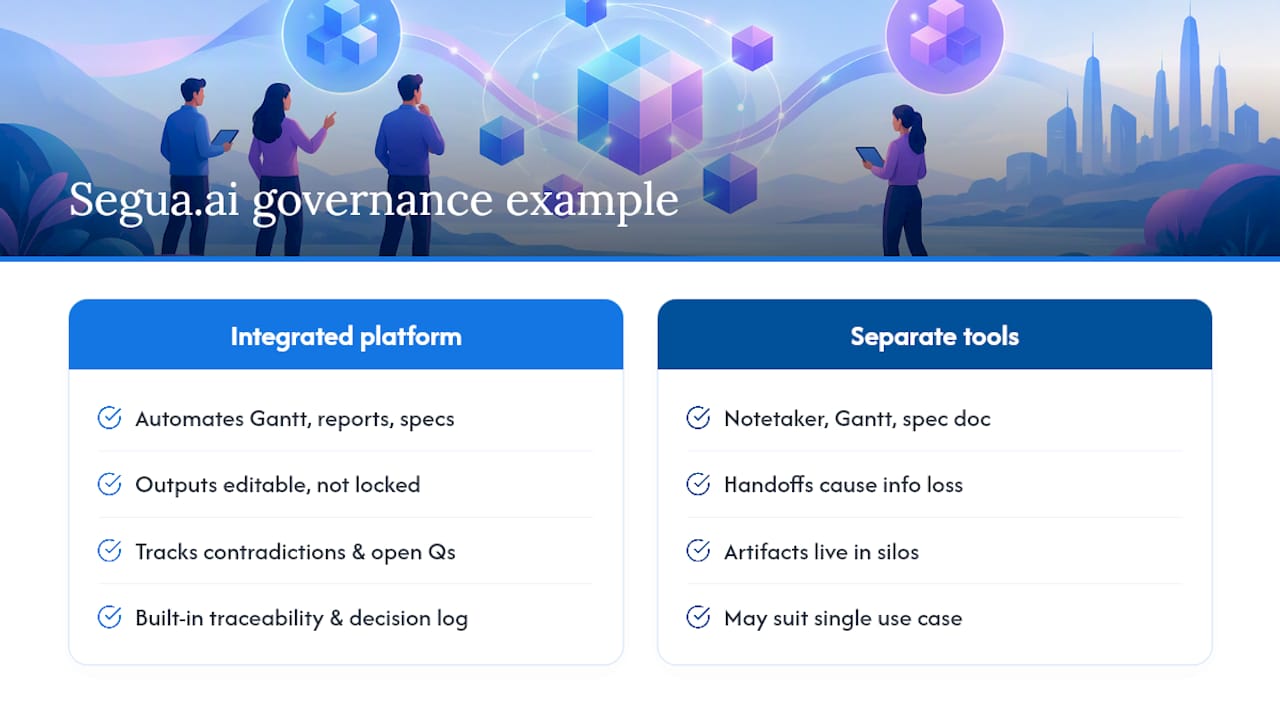
Segua.ai illustrates what the governance principles above look like in practice. The platform automates the artifacts covered earlier in this piece: Gantt charts, meeting reports, and requirements specifications generated directly from uploaded content or recorded meetings, with every output editable rather than locked.
Its standout governance feature is tracking contradictions and unanswered questions across a project’s full history, so a requirement that conflicts with an earlier decision doesn’t slip through unnoticed. That directly supports the traceability and decision-log practices described above.
Teams juggling several point tools (a notetaker, a Gantt builder, a separate spec document) often find the handoffs between them are where information gets lost. An integrated platform versus separate tools is worth weighing once your pilot outgrows a single use case.
An Editorial Take: AI Augments Judgment, It Doesn’t Replace It
AI won’t run your project. It multiplies whatever discipline you already bring to it, and a bad plan fails faster with AI, not slower. Pilot small. Require a human sign off. Track outcomes, then adjust before you scale.
Get Started With Segua.ai
Everything covered above, meeting-to-document automation, contradiction tracking, full traceability from recording to final artifact, is what Segua.ai runs on. It replaces the patchwork of a notetaker, a separate Gantt tool, and a manually maintained requirements doc with one system that keeps every output linked back to its source meeting.
Segua’s Pro plan runs 39 EUR per month based on meeting hours used, with extra hours billed at 2.50 EUR per hour and an Enterprise option for larger teams with volume needs. If you want to see the automation before committing to a plan, try a free meeting transcription and check whether the generated minutes and action items hold up against what you remember from the call. That single test tells you more than any product page can.
FAQ
Can AI Do Project Management?
AI can automate documentation, generate forecasts from historical data, and flag risks, but it can’t own accountability for project decisions. Think of it as handling the repetitive analytical work while a human PM still makes the calls that carry real consequences, a division PMI’s AI standard is built to formalize.
Will PMP Certification Be Replaced by AI?
No. PMP certification is adapting rather than disappearing. Recent PMP exam changes shifted more weight toward business context and AI integration, signaling that AI literacy is now an expected part of PM competency rather than a threat to the credential itself.
Is There a Free Course in AI Project Management?
PMI offers learning resources and guidance on AI in project management, some of which are accessible without a paid certification track, through its AI in Project Management hub. Paid options like Coursera’s Generative AI for Project Managers specialization go deeper into hands-on tool use if you want structured, applied practice.
How Much Do AI Project Managers Get Paid?
There’s no separate salary category yet for “AI project manager,” but certification remains the clearest signal tied to pay. PMI’s salary survey found PMP holders earn about 33% higher median salaries than non-certified peers, and AI fluency is increasingly bundled into what that certification represents to employers.
What Does Segua.ai Cost?
Segua’s Pro plan is 39 EUR per month, billed according to meeting hours used, with extra hours at 2.50 EUR per hour. Enterprise pricing is available on request for teams with larger volume needs.