
Fix Action Items From Meetings: 5 Part Template + AI for Teams

An action item from a meeting is a discrete task, assigned to exactly one owner, with a deadline attached. The moment someone says they’ll do something, write it down in that format on the spot and drop it into your team’s single tracker before the meeting ends. Everything else, the templates, the AI extraction workflows, the verification checklists, exists to make that one habit reliable.
TL;DR:
- Action items require a clear owner, concrete action, and specific deadline; vague language or missing elements render them incomplete.
- Using a structured five-part template and real-time capture during meetings ensures action items are precise, actionable, and easily trackable.
- Consistent review of outstanding items at the start of recurring meetings significantly improves follow-through and completion rates.
- Automating extraction with AI tools speeds up documentation but must be followed by human verification to prevent errors like misattribution or ambiguous dates.
- Piloting a focused action-item workflow for several weeks and monitoring completion metrics proves effectiveness before scaling across all meetings.
Table of Contents
- What an Action Item Actually Is (and What It Isn’t)
- The Five Elements Every Good Action Item Needs
- How to Capture and Write Action Items During (and Right After) a Meeting
- Tracking and Follow-Up: The Routines That Make Action Items Stick
- Using AI to Extract Action Items: Where It Helps and Where Humans Still Have To Check
- Piloting an Action-Item Workflow: What Actually Moves the Needle
- The Real Problem With Most Action-Item Advice
- A Faster Way To Get From Meeting to Tracked Action Items
- Primary Sources Worth Reading Next
- Sources
- FAQ
What an Action Item Actually Is (and What It Isn’t)
An action item is a task assigned to a specific person with a deadline, documented so it can be tracked to completion. That’s the standard definition boards and project teams use, and it’s narrower than most people treat it in practice. A decision (“we’re moving to the new vendor”) is not an action item. A discussion point (“we should revisit pricing next quarter”) is not one either. Both belong in meeting minutes, but neither has an owner or a due date, so neither goes on the tracker.
Here’s where teams get sloppy:
- Decisions get recorded as facts, not tasks. “Approved the Q3 budget” needs no owner because nobody has to do anything next.
- Discussion points capture context or disagreement. They matter for the record but generate no immediate obligation.
- Action items always answer three questions: who, what, and by when. If any answer is missing, it isn’t finished yet.
- Open questions (unresolved issues nobody has claimed) are close cousins of action items but need a different tag, since they’re waiting on information, not effort.
Confusing these categories is expensive. Harvard Business Review’s meeting-cost calculator makes the arithmetic uncomfortably visible: multiply attendee count by average salary and meeting length, and a routine one-hour status call for eight people can run several hundred dollars in pure labor cost. A meeting that produces vague notes instead of assigned tasks has burned that money for nothing measurable.
There’s also a sizing question worth settling early: when does a “task” become a “project”? A rough rule that works for most teams: if it needs one person, one deliverable, and less than two weeks, it’s an action item. If it needs multiple people, multiple deliverables, or stretches past two weeks, it’s a project that deserves its own plan, its own milestones, and probably its own kickoff.
The Five Elements Every Good Action Item Needs
Vague capture is the single biggest reason action items die in a spreadsheet nobody reopens. The fix is a fixed structure. Granola’s analysis of meeting-minute practices lays out a five-part formula that holds up across industries: owner, action verb plus concrete deliverable, deadline, context or acceptance criteria, and priority or status.
- Single named owner. Not “marketing” or “the team.” One person’s name. Shared ownership is how tasks quietly disappear.
- Action verb plus deliverable. “Discuss the contract” is not a task. “Send the revised contract to Legal for review” is.
- Absolute deadline. A date, not a vibe. “Soon” and “by end of week” invite different interpretations from every person who reads them; specify a date and, for distributed teams, a time zone.
- Context or acceptance criteria. One line explaining why the task exists and what “done” looks like, so the owner isn’t guessing three days later.
- Priority and status. A simple tag (High, Medium, Low) plus a status field that starts at “Not started” and moves through the tracker over time.
The status field deserves a fixed vocabulary. Stick to three values: Done, In progress, and Blocked. Anything more granular invites debate about definitions instead of progress.
Rewrites make the difference concrete. Here’s what weak capture looks like next to a properly structured version:
Weak: “Sarah will look into the vendor thing.” Rewritten: “Sarah emails three shortlisted vendors for updated quotes by Thursday, October 9, so Finance can compare pricing before the November budget review.”
Weak: “We need to fix onboarding at some point.” Rewritten: “Marcus drafts a revised onboarding checklist for new hires and shares it in the #ops channel by end of day Friday. Priority: Medium.”
Weak: “Someone should follow up with the client.” Rewritten: “Priya calls the client to confirm the revised launch date, no later than 3 PM Wednesday. Blocked until legal confirms the new terms.”
Notice the pattern: every rewrite names a person, uses a verb that produces something concrete, and pins a date. Nothing about that formula is complicated. What’s hard is doing it consistently, in real time, while six other things are happening in the room.
How to Capture and Write Action Items During (and Right After) a Meeting
Most action items get lost not because nobody wrote them down, but because nobody wrote them down clearly in a findable place. Fixing that is mostly a matter of discipline and placement, not new software.
Step 1: Decide who captures items and where they live. Someone, usually the meeting organizer or a designated note taker, owns capture for the session. That person needs somewhere consistent to put action items, and there are three practical placements to choose from:
- Top of the notes, as a running list that grows as the meeting happens. Best for short, focused meetings with a tight agenda.
- In-context, embedded next to the discussion that produced them. Best for longer strategic meetings where the reasoning behind a task matters later.
- Standalone list at the end, pulled out from the discussion and consolidated. Best for meetings with many small decisions across multiple topics, since it gives one scannable summary.
Pick one placement per meeting type and stay consistent. Switching formats week to week is how people stop trusting the notes altogether.
Step 2: Capture using the five-part template in real time. Write items as they’re spoken, not from memory afterward. A simple table works well during the meeting itself:
| Owner | Action | Due date | Context/acceptance | Priority |
|---|---|---|---|---|
| Diego | Finalize vendor comparison sheet | Oct 9 | Needed before budget review | High |
| Ana | Share revised onboarding checklist | Oct 4 | Post in #ops channel | Medium |
Step 3: Turn vague verbal commitments into a first concrete step. When someone says “I’ll handle the redesign,” that’s a project pretending to be a task. Ask, on the spot: “What’s the first thing you’ll do, and by when?” If the honest answer is more than two weeks out, break it into a first milestone with its own owner and date, then log the larger project separately.
Step 4: Distribute the same day. Indeed’s guide to managing meeting action items recommends sending a short follow-up, ideally within hours, not days. A one-line email or message per item works better than a wall of text: name, task, due date, and a link back to the full notes. People who see their name attached to a deadline within the same day treat it very differently than people who find out three days later in a recap nobody read closely.
Pro Tip: Read every action item back out loud before the meeting ends, and ask the named owner to confirm it in one word. That ten-second habit catches misattributed owners and fuzzy deadlines before they ever reach the tracker.
Tracking and Follow-Up: The Routines That Make Action Items Stick
Capturing an action item well is half the job. The other half is making sure it doesn’t quietly rot in a document nobody reopens.
Start with a single source of truth. Every action item from every meeting should land in one tracker, whether that’s a shared spreadsheet, a Kanban board, or a project management tool, rather than scattered across email threads, chat messages, and personal notebooks. If your team already runs work through a PM tool, sync new items into it directly rather than maintaining a parallel list; duplicated trackers are where accountability quietly evaporates.
Recurring meetings should open, not close, with accountability. Spend the first five minutes reviewing outstanding items from last time: what’s done, what’s in progress, and what’s blocked. This single habit does more for completion rates than almost any other change a team can make, because it puts a deadline back in front of people while there’s still time to act on it.
Use the three-state taxonomy consistently: Done, In progress, Blocked. When a deadline passes without completion, don’t just quietly push the date. Roll it forward with a short note explaining why it slipped, a new date, and, if the reason reveals something structural (the owner is overloaded, the task was underscoped), flag that too. A pattern of rolled-forward items without notes is usually a sign the tracker has become decorative rather than functional.
A few numbers are worth watching monthly:
- Completion rate: the percentage of items closed by their original due date.
- Percentage of undated items: any action item that made it into the tracker without a deadline is a leading indicator of future slippage.
- Average time to close: how long items sit open after their due date passes, which tells you whether “Blocked” status reflects real obstacles or just neglect.
Statistic to keep in mind: meetings are not cheap to run. Using HBR’s meeting-cost framework, an eight-person, hour-long weekly sync can carry a real labor cost that compounds fast across a quarter. Every action item that stalls without follow-through is a fraction of that cost spent for nothing measurable. Tracking completion rate isn’t paperwork, it’s the only way to know whether meetings are actually producing value.
For calendar integration, set due-date reminders directly on the owner’s calendar rather than relying on them to check the tracker. And if your team already uses a tool for logging decisions and keeping an audit trail across meetings, something like Betlog for tracking commitments and evidence, map action items into that same system so decisions and follow-through live in one place instead of two.
Using AI to Extract Action Items: Where It Helps and Where Humans Still Have To Check
Modern meeting tools can transcribe a conversation and pull out commitments automatically, and the workflow has become genuinely fast. Zoom’s AI note-taking feature, for instance, transcribes meetings, extracts summaries and next steps, and can trigger downstream workflows like creating tasks or sending recap emails. The general shape of a good extraction workflow looks like this: record the meeting, generate a clean transcript, run a structured extraction prompt against it, verify the output by hand, then distribute.
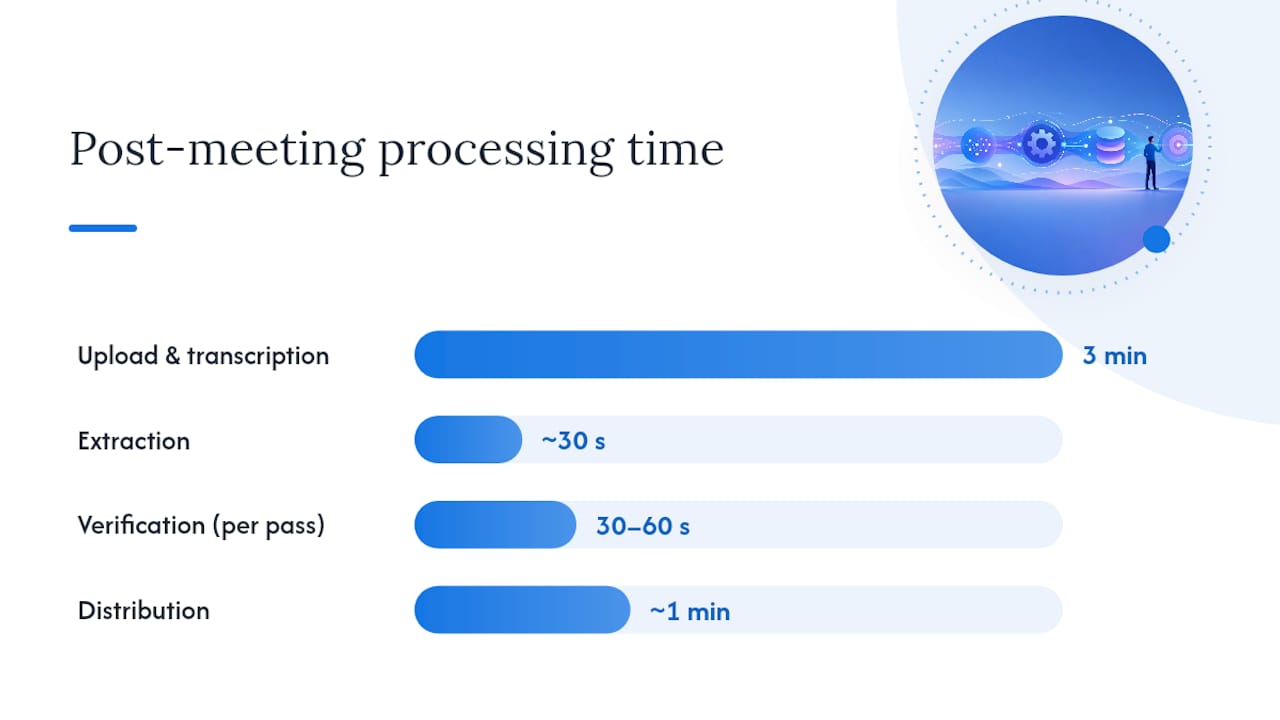
Done well, that loop is fast. One structured-extraction guide describes a 60-minute meeting going from raw recording to verified, distributed action items in under 10 minutes total, split roughly as upload and transcription (a few minutes), extraction (seconds), verification (30 to 60 seconds per pass), and distribution (about a minute). The rise of tools like this tracks with a broader shift: Gartner projected the collaboration and social software market to nearly double over recent years, and automated extraction is a big part of what teams are buying into.
The fields worth extracting on every pass are consistent: owner, action written as an imperative verb, due date, dependency (what it’s blocked on, if anything), and confidence (how certain the extraction model is that it read the commitment correctly).
That confidence field matters because AI extraction fails in predictable ways:
- Implicit commitments (“I could probably get to that”) get flagged as action items when they were never firm agreements.
- Mis-attributed owners happen when multiple speakers discuss the same task and the model picks the wrong name.
- Noisy audio from cross-talk or poor microphones garbles names and dates.
- Date ambiguity turns “next Friday” into a guess rather than a fixed date.
None of that makes automated extraction unreliable, it makes verification non-negotiable. Experts generally agree that AI reliably surfaces the raw material, but a human still needs to interpret strategic nuance and resolve ambiguous language. Run this checklist in 30 to 90 seconds before anything goes out:
| Check | What to do |
|---|---|
| Low-confidence items | Re-listen to that segment or ask the owner directly |
| Missing dates | Assign a specific date, never leave “TBD” |
| Unassigned owners | Name someone before distribution, not after |
| Wrap-up revocations | Confirm nothing was canceled or reassigned near the meeting’s end |
Automation earns its keep on long, dense meetings where dozens of small commitments get buried in conversation. Manual capture still wins for short, high-stakes meetings where a human in the room can ask a clarifying question the moment something’s unclear, something no transcript can do after the fact. A hybrid approach that automates the heavy lifting of documentation while keeping a person in the loop for the final check, similar to how Segua frames it, tends to outperform either extreme on its own.
Piloting an Action-Item Workflow: What Actually Moves the Needle
Don’t roll out a new action-item process across every meeting on the calendar at once. Pick one recurring meeting, run the five-part template and single-tracker habit for four to six weeks, and track completion rate weekly. That window is long enough to see a real pattern and short enough that a stalled pilot doesn’t quietly become permanent.
The friction you’ll hit almost always comes from one of two places: capacity or clarity. If people miss deadlines because they’re genuinely overloaded, no template fixes that, you need to redistribute work or extend the timeline honestly. If they miss deadlines because the task was fuzzy, that’s a capture problem, and it’s fixable immediately by tightening the rewrite at the point of capture.
Prove the pilot worked with three numbers: completion rate before and after, the drop in undated items, and average time to close. Teams that skip measurement almost always let the new habit slide back into old patterns within a quarter.
The Real Problem With Most Action-Item Advice
Most guidance on this topic treats action items as a documentation problem. Write it down clearly, the advice goes, and follow-through improves. That’s only half right. The research on meeting costs and completion patterns points somewhere less comfortable: the biggest failure point isn’t capture quality, it’s the absence of a review ritual. Teams that write beautiful five-part action items but never revisit them in the next meeting see the same completion rates as teams scribbling on napkins.
The conventional advice also underrates how much AI extraction has changed the cost of good documentation. A few years ago, writing owner, verb, deadline, and context for every commitment in a 90-minute meeting was genuinely tedious, which is exactly why teams skipped it. Structured extraction tools have mostly solved that cost problem. What they haven’t solved, and won’t, is judgment: knowing when “I’ll look into it” was a real commitment versus a polite deflection.
If you take one thing from this article, make it the five-minute review at the start of your next recurring meeting. Everything else, the templates, the AI tooling, the status taxonomy, only works if that review habit exists to catch what slips through.
A Faster Way To Get From Meeting to Tracked Action Items
Writing five-part action items by hand for every meeting is the right habit, but it’s slow when you’re doing it for three meetings a day. Segua automates the extraction step, turning a recorded meeting or uploaded transcript directly into structured minutes, assigned action items, and a running list of open questions and contradictions the discussion never resolved, so nothing important gets buried in a 90-minute recording.
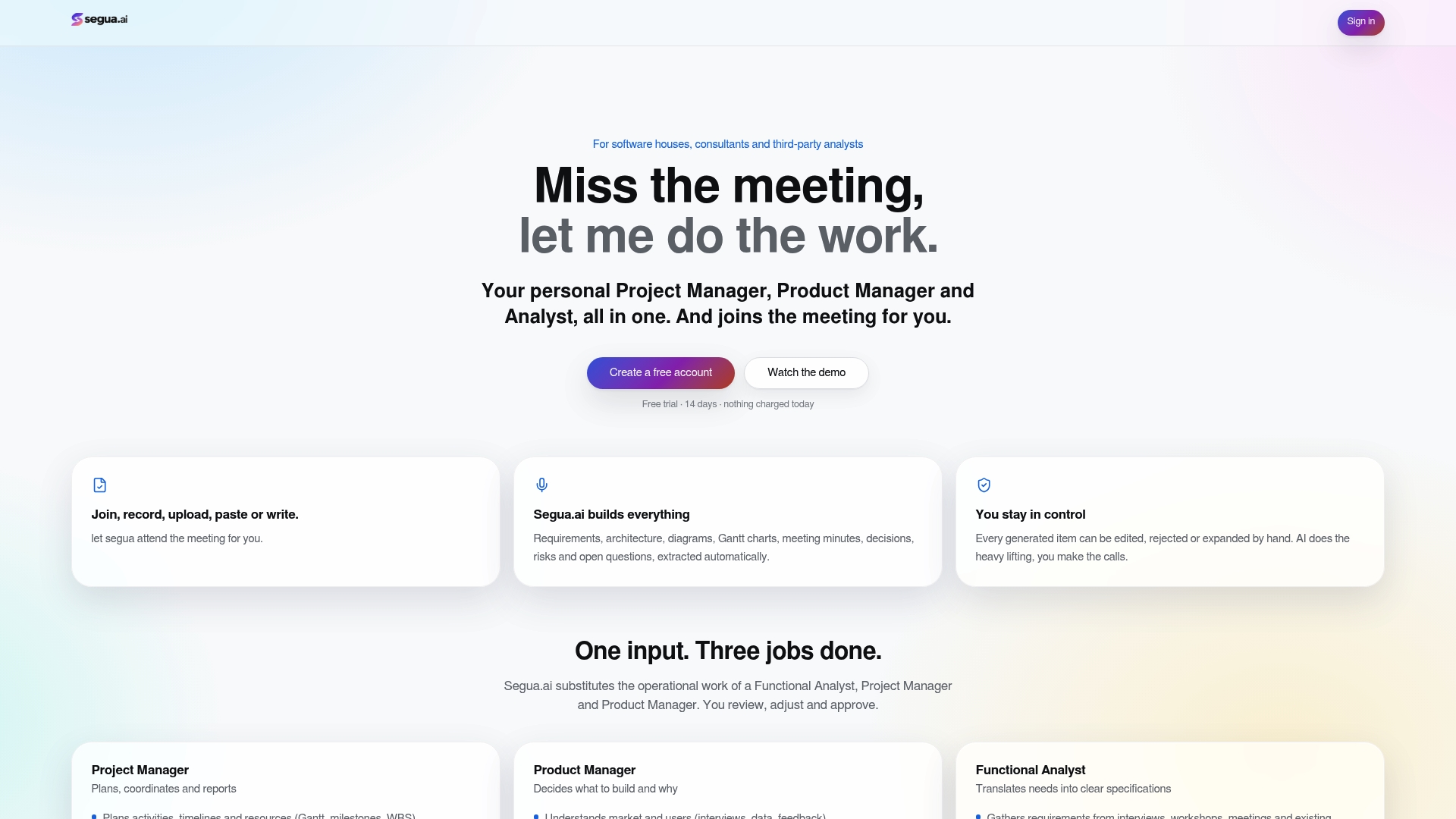
That output isn’t a black box you have to trust blindly. Every generated action item, owner, and deadline is editable before it goes anywhere, which matches the verification step this article has been recommending throughout: let automation do the heavy lifting of extraction, then have a human confirm owners, dates, and priorities before distribution. The same traceability that flags an open question also links every action item back to the exact moment it came up in the meeting, so a rushed reviewer can double-check the source in seconds rather than re-listening to the whole recording.
For teams evaluating whether this fits their workflow, the use-cases page walks through how meeting-to-action automation plays out across project, product, and requirements work. Pricing runs on a Pro plan at €39 per month, with extra meeting hours billed at €2.50 per hour and an Enterprise option for larger teams, both quoted on the pricing page. If you’d rather see it work first, try a free meeting and get a real set of action items out of your next recording in under a minute.
Primary Sources Worth Reading Next
For deeper reading beyond this guide, Zoom’s AI note-taking documentation shows how automated transcription and extraction workflows operate in practice. Atter-AI’s extraction guide walks through a structured prompt and verification workflow in more technical detail. Granola’s how-to guide offers additional rewrite examples and templates. For canonical definitions and best-practice checklists, see the board-portal glossary on action items and Indeed’s guide to managing meeting action items.
Sources
- How to write action items in meeting minutes (with examples) | Granola
- AI note taker: Your AI Meeting Assistant | Zoom
- What are Meeting Action Items? | Board Portal Glossary
- How To Manage Action Items in Meetings (Plus Best Practices) | Indeed
FAQ
What Are Action Items in a Meeting, With Examples?
An action item is a specific task assigned to one person with a deadline, like “Diego finalizes the vendor comparison sheet by October 9.” Contrast that with a decision (“approved the new vendor”) or a discussion point (“revisit pricing next quarter”), neither of which has an owner or due date attached.
What Are Some Examples of Good Action Items?
Strong action items name an owner, use a concrete action verb, and include a firm deadline: “Ana shares the revised onboarding checklist in #ops by Friday” or “Priya calls the client to confirm the launch date by 3 PM Wednesday.” Each follows the five-part structure of owner, action, deadline, context, and priority.
What Are Action Items in Meeting Minutes?
In meeting minutes, action items are the discrete, assigned tasks pulled out from general discussion and listed separately, either at the top, in-context, or as a standalone list, so they can be tracked to completion after the meeting ends. They’re distinct from decisions and open questions, which get documented but don’t require the same owner-and-deadline tracking.
How Do You Write Action Points From a Meeting?
Capture each point using owner, action verb plus deliverable, due date, context or acceptance criteria, and priority, then confirm it out loud with the named owner before the meeting ends. Indeed’s guide to meeting action items recommends distributing the finalized list the same day, ideally within a few hours.
Can AI Reliably Extract Action Items From a Recorded Meeting?
AI extraction tools can transcribe a meeting and pull out likely commitments with reasonable accuracy, but a short human verification pass is still necessary to catch implicit language, mis-attributed owners, and ambiguous dates. Platforms like Segua build that verification step directly into the workflow, letting you edit owners, dates, and priorities before anything gets distributed.